User attention is becoming a more and more scarce commodity in the current digital landscape. To make the most out of it, businesses are seeking ways to streamline access to information and services.
This is where web portals, centralized platforms designed to aggregate resources into one intuitive interface, can come into play. They offer a powerful solution for reducing complexity and improving user experience to ensure that each precious second of users’ time is spent meaningfully. With the boom of AI-powered tools during the last few years, the possibilities offered by web portals have skyrocketed, making them almost a must for certain types of businesses.
But what sets a web portal apart from a traditional website, and why are they becoming a cornerstone of modern digital strategies? In this piece, we’ll delve into the core concepts of web portals and explore their unique features and benefits.
Whether you’re considering implementing a web portal for your organization or simply curious about their role in digital transformation, this comprehensive guide is the place to begin your journey.
Table of contents
- What is a web portal?
- Web portal vs. traditional website
- Types of web portals and their use cases
- Key benefits of implementing a web portal
- Planning, designing, and implementing your web portal
- Main challenges of implementing a web portal
- What to look for in web portal implementation services
- Transform your digital strategy with web portals
What is a web portal?
In simple terms, a web portal is a website taken to the next level. It’s a centralized online platform designed to provide users with a single point of access to various information, services, and resources.
Traditional websites, such as the one you’re reading right now, pull data and the content they present from a single source. All the texts and images come from a single content management system (CMS). In our case, this is WordPress.
Web portals, on the other hand, aggregate data and tools from multiple sources and present them in an organized and user-friendly manner. They often include features like:
- search engines.
- news feeds.
- email services.
- discussion forums,
- links to external resources.
Many web portals are customizable and allow users to personalize their experience by selecting the content and services most relevant to their needs. Acting as a hub for information and interaction, web portals enhance user experience by improving access to relevant resources. They also reduce navigation complexity: instead of frantically switching between various browser tabs, users can find all relevant information in a single place.
Web portal vs. traditional website
In the previous section, we’ve hinted at the key factor that separates traditional websites from web portals, but the story goes much further. Here’s a comprehensive overview of all the key factors you should consider.
Here is an expanded table that captures more differences between a website and a web portal:
| Aspect | Website | Web portal |
| Content type | Static or periodically updated, focusing on broad topics. | Dynamic and often aggregated from multiple sources, customized for each user. |
| User interaction | Limited interaction; primarily informational or transactional. | Extensive interaction, including personalized dashboards, notifications, and collaborative tools. |
| Authentication | Typically no authentication is required, except for specific actions (e.g., purchases). | Usually requires user authentication to access tailored content and services. |
| Integration | Focused on standalone content or services, with limited integration of external systems. | Integrates multiple services and systems, such as customer relationship management (CRM), enterprise resource planning (ERP), or third-party tools. |
| Audience | Broad and generic: anyone with internet access. | Specific, targeted user groups such as employees, customers, or students. |
| Accessibility | Open to all users: no special restrictions except for specific content. | Restricted to registered or authorized users with specific access rights. |
| Scalability | Less complex to scale as the architecture is straightforward. | More complex to scale because of system integrations and user-specific data. |
| Search capability | Basic site-wide search for content or products. | Advanced search with filters tailored to the user’s needs and context. |
| Security | Basic security measures, such as HTTPS for data transmission. | Enhanced security with role-based access control, encryption, and user authentication layers. |
Beyond a Website: Build a Web Portal That Works for You
As outlined above, a web portal goes far beyond a traditional website—it centralizes interactions, streamlines processes, and integrates critical business functions. But how do you ensure your portal is built for long-term success?
Our Discovery Phase helps define:
- The right architecture and functionality for your needs
- How to integrate with existing systems efficiently
- A scalable approach that grows with your business
and much more!
Map out the best strategy for your web portal
Types of web portals and their use cases
Depending on their target audience, web portals can serve diverse purposes. Here are some of their most popular use cases that might inspire your implementation.
Enterprise portals
Enterprise portals are internal web platforms used by organizations to provide employees with easy and secure access to company tools and resources, tools. These portals typically integrate features like:
- document management systems.
- HR tools.
- project management applications.
- communication tools like chat or video conferencing.
By consolidating these resources into one interface, enterprise portals improve employee productivity and facilitate more effective collaboration. For example, an enterprise portal might enable employees to check their work schedules, submit leave requests, and collaborate on shared documents without switching between multiple applications. What traditionally would require three different logins into separate services now happens in a single place.
Educational Portals
Educational portals offer centralized access to academic resources to students, teachers, and administrators. These platforms can include features such as:
- virtual classrooms.
- course materials.
- discussion forums.
- grade tracking.
- online assignments.
As you can see, educational portals, such as the one we created for the University of Vienna, can serve as a slice of school and college life elevated into the digital realm. Almost everything that normally happens on physical campuses can be seamlessly reflected in a single convenient digital space.
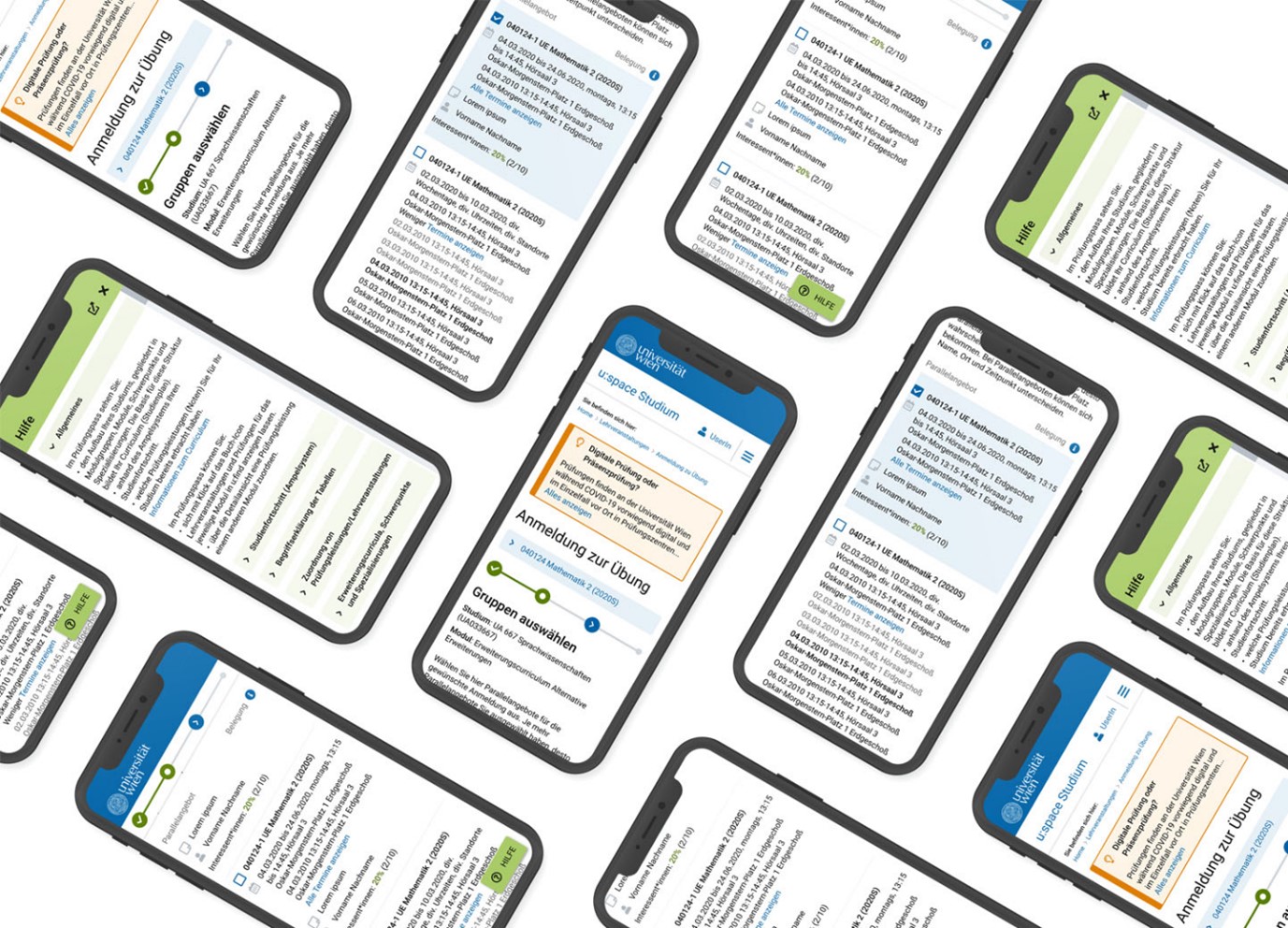
For students, an educational portal provides a convenient way to complete assignments and access lectures. Teachers can use the portal to manage coursework and evaluate students, while administrators can enjoy modules for registering students, processing documentation, and much more. An educational portal can also serve as a communication hub that seamlessly connects the three parties mentioned above as well as third-party users, such as parents or examination boards.
Customer support portals
Businesses implement customer support portals to streamline communication with their customers. These portals typically include features like:
- knowledge bases and FAQs.
- ticketing systems.
- live chat support.
From the customers’ perspective, support portals empower them to find answers to common questions and resolve problems on their own, but also conveniently submit service requests and track their status when needed. Companies that provide self-service tools and efficient communication channels report higher customer satisfaction while reducing the workload for their support teams.
Customer service web portals are also one of the areas where AI and large language model (LLM) solutions can shine the most. Tools like chatbots, various types of predictive analytics, and fine-tuned search functionalities can make finding solutions even more seamless and drastically remove the need for human intervention.
eCommerce portals
Finally, in eCommerce, the web portal technology enables the marketplace business model, famously implemented by the likes of Amazon and eBay. Marketplaces aggregate products or services from multiple vendors, offering the convenience of effectively browsing the offerings of multiple stores in a single interface.
Key benefits of implementing a web portal
If you’ve been reading carefully so far, you’ve probably already noticed some of the key benefits of web portals that the previous sections hinted at. Let’s take a look at them in more detail and add a few more to the list.
Centralized access to information and services
One of the primary advantages of a web portal is its ability to consolidate diverse resources into a single platform. Simply put, users no longer need to navigate multiple systems or platforms to access the information they need. This centralization reduces time spent switching between systems and minimizes the risk of information silos.

Enhanced user experience through personalization
Web portals often include features that allow users to personalize their experience, such as dashboards and customized notifications. By tailoring content and tools to individual preferences or roles, portals ensure that users enjoy an intuitive experience and can easily access the most relevant resources.
Improved communication and collaboration
Many web portals are equipped with AI-powered collaboration tools like shared document management and chat systems. These features foster better communication among users, whether they are employees, customers, or other stakeholders.
Increased efficiency and productivity
By automating routine tasks and simplifying access to resources, web portals increase efficiency for businesses and third-party users, such as customers. For example, self-service portals enable users to perform tasks independently, such as booking appointments or resetting passwords, without relying on support staff. This reduces operational costs for the organization while saving time for customers.
Scalability and integration with other systems
Web portals are designed to integrate seamlessly with other tools and systems, such as CRM and ERP systems. This integration enables organizations to scale their operations efficiently as they grow. For instance, a retail business using an eCommerce portal can start off as a traditional single-vendor store and later evolve into a marketplace.
Cost savings
Web portals can significantly reduce costs by automating processes and minimizing the need for manual intervention. For instance, a government service portal reduces paperwork and administrative overhead by allowing citizens to complete tasks like paying taxes or applying for permits online. Similarly, customer support portals reduce the workload for help desk staff by enabling users to find answers through FAQs and knowledge bases.

Data security
Modern web portals come with robust security features, including role-based access control, data encryption, and multi-factor authentication. These measures ensure that sensitive information is accessible only to authorized users. For example, enterprise portals can restrict access to confidential files based on employee roles.
Planning, designing, and implementing your web portal
Let’s say you’re fully convinced that a web portal is the way to go for your company. What now?
Creating a successful web portal requires a combination of strategic planning, thoughtful design, and methodical implementation. A well-executed web portal should, above all else, align with the organizational goals and meet the needs of its users. It’s surely easier said than done, though. To make the process a little less daunting to you, here’s a step-by-step guide that integrates the planning, design, and implementation phases.
Step 1: Assessing user needs and objectives
The first step in the process is to understand the needs of your target users and define the portal’s objectives. Conduct interviews with various stakeholders to identify key requirements, such as the types of tasks users will perform, the tools they need, and their level of technical proficiency. Define measurable goals that align with your organization’s mission. Some of the most common ones would be improving customer service, streamlining internal workflows, or enhancing collaboration.
Step 2: Defining roles and content structure
Once user needs are clear, define the roles and permissions for each type of user. This ensures users have access only to the tools and information that’s relevant to their needs while maintaining security. For instance:
- Customers may access self-service tools, FAQs, and support tickets.
- Employees might need access to internal knowledge bases, team collaboration tools, and performance dashboards.
- Administrators require broader permissions for managing users, monitoring analytics, and updating content.

Additionally, map out the content structure of the portal to organize it into logical categories and sections that will make navigation intuitive.
Step 3: Designing the UX and UI of the portal
The user experience (UX) and user interface (UI) design are critical to the portal’s usability. Focus on creating a responsive, intuitive, and visually appealing layout that simplifies navigation. Key design considerations should include:
- Personalization: Allow users to customize their dashboards or profiles.
- Accessibility: Follow standards like WCAG to make the portal inclusive for all users.
- Responsive design: Ensure compatibility across devices, including desktops, tablets, and smartphones.
You’ll likely be going through multiple ideas and iterations at this stage, so be smart about the amount of work that you’re putting in. Take advantage of simple prototyping tools to create quick mockups and gather feedback from stakeholders and test users.
Step 4: Selecting the technology stack
Next, choose a technology stack that supports the portal’s functionality, scalability, and performance. This includes:
- Front-end technologies: Frameworks like React or Angular for modern, performant, and modular interfaces.
- Back-end technologies: Technologies like Java or Node.js to manage server-side functionality for storing and finding things appropriately.
- Databases: Battle-tested systems like PostgreSQL, scalable systems like MongoDB and Elasticsearch.
- Hosting and deployment: Containerized solutions for deployment on Cloud platforms like Microsoft Azure, AWS, or on-premise for reliable and scalable hosting.
We ensure that, on top of being the right choice for the portal you’re designing, the chosen stack integrates seamlessly with your existing systems. For instance, you might want to connect your CRM and ERP systems or eCommerce platforms, or have specific in-house skills, which you want to leverage.
Step 5: Development and integration
With the design finalized and the tech stack selected, it’s time to begin the proper development phase. This includes building the front-end and back-end components, integrating third-party tools, such as payment gateways and chat systems, and setting up databases.
If this is the first web portal that your business is building, Agile methodologies can be especially useful. Because there surely will be some trial and error involved, approaching the project in an Agile way will let you build the portal iteratively and allow for regular testing and feedback.
Step 6: Testing and quality assurance
During the development of the portal, conduct regular testing to identify and address any issues. This should include:
- Functional testing: Ensuring all features work as expected.
- Usability testing: Gathering feedback from a group of test users to evaluate the portal’s intuitiveness and functionality.
- Performance testing: Verifying the portal can handle high traffic without hickups or downtime.
- Security testing: Checking for vulnerabilities, such as data breaches or unauthorized access.
Iterate on the feedback to fine-tune the portal and resolve any critical issues.
Step 7: Deployment and launch
After testing, the portal is ready for deployment. Use a staging environment to ensure the portal performs as expected in a live setting before making it publicly available. It’s usually a good practice to plan a phased rollout, starting with a small group of users before expanding to the full audience. During the launch, make sure not to leave the users on their own. Provide them with onboarding resources, such as tutorials or help guides, to familiarize them with the portal’s features and ensure the transition goes smoothly for both sides.
Step 8: Monitoring, maintenance, and continuous improvement
Make sure to monitor the portal’s performance using analytics tools to track user behavior, identify bottlenecks, and gather feedback. Regularly collect user feedback and update the portal with new features, address bugs, and optimize its performance to meet evolving user needs. It’s easy to overlook this point, but maintenance tasks, such as security patching and database optimization, are also critical to ensuring long-term success.
Start your Discovery Phase today
Main challenges of implementing a web portal
When you fail to fully understand the needs and expectations of users, it’s easy to create a portal that either lacks necessary features or is overly complicated. This might lead to poor user adoption and dissatisfaction. Simply put, you’ll put in all the work just to end up with a product that really isn’t for anyone.
Solution:
- Conduct thorough user research through surveys, interviews, and focus groups.
- Develop user personas and journey maps to understand different user groups and their interactions with the portal.
- Engage users throughout the design and testing phases to gather feedback and refine features.

Achieving the desired user adoption rates
Even a well-designed portal may fail if users don’t adopt it due to a lack of awareness, training, or perceived value.
Solution:
- Provide comprehensive onboarding resources, such as tutorials, webinars, and help guides.
- Highlight the benefits of the portal and demonstrate how it simplifies users’ tasks.
- Collect user feedback post-launch and make continuous improvements to enhance the portal’s usability and relevance.
- At the early stages, you might also want to consider other incentives for users who migrate to the new portal, for instance, discounts on your products.
Scope creep
There isn’t a defined set of features that a “by the books” web portal should have, which can be both a blessing and a curse. If stakeholders are allowed to request more and more features, the scope of the project can expand uncontrollably. This can delay the project, increase costs, and overcomplicate the portal’s design.
Solution:
- Clearly define project goals, deliverables, and timelines during the planning phase.
- Use a structured project management methodology, such as Agile, to accommodate changes in smaller iterations while maintaining overall focus.
- Establish a process for evaluating new feature requests to determine their priority and feasibility.
Integration with existing systems
Web portals often need to integrate with legacy systems, such as CRM and ERP systems or third-party APIs. Integration challenges can result in data inconsistencies or system downtime.
Solution:
- Conduct a thorough review of existing systems to understand their compatibility with the new portal.
- Use middleware or APIs to bridge gaps between legacy systems and modern platforms.
- Test integrations extensively in a staging environment before deploying them live.
What to look for in web portal implementation services
While web portals are designed to simplify workflows and enhance user experiences, their implementation can involve complex processes requiring professional expertise. Collaborating with the right expert team can make a significant difference, ensuring your portal is tailored to your business needs while delivering maximum value.
Choosing a partner for your web portal implementation project is not solely about technical proficiency. The ideal provider should deeply understand your business goals, recognize your unique strengths, and design a portal that highlights and supports them effectively. Here’s what to evaluate when selecting a web portal implementation service.
Proven experience in business-critical implementations
Select a provider with a strong track record in delivering successful web portal projects for organizations with complex requirements. They should:
- offer reliable and scalable solutions designed to address the specific needs of your organization.
- have experience working across industries, ensuring their ability to handle varied challenges and use cases.
- deliver results-focused solutions that improve workflows, user engagement, and operational efficiency.
Commitment to security, quality, and compliance
Web portals often handle sensitive data, making it essential to prioritize a provider committed to high standards of security and compliance. Ensure they:
- follow industry best practices to implement robust and secure systems.
- integrate strong data protection measures throughout the implementation process.
- demonstrate compliance with relevant regulations, such as GDPR, HIPAA, or industry-specific requirements, safeguarding your organization’s operations and reputation.

Focus on scalable and future-ready solutions
Implementing a web portal isn’t just about meeting today’s requirements; it’s about preparing for future growth. Look for a partner who:
- designs scalable portals that can grow alongside your business or organization.
- leverages cutting-edge technologies and integrations to future-proof your portal.
- Leverages AI to optimize workflows and ensure infrastructure is designed for long-term performance and reliability.
Combining immediate and long-term value
The right implementation partner should help you achieve quick results while setting the foundation for ongoing success. Look for a partner that:
-
- delivers immediate value by addressing critical pain points, streamlining operations, or improving user experiences from day one.
- identifies opportunities to enhance the portal with advanced features, personalization, or automation, maximizing return on investment.
- commits to ongoing support, updates, and maintenance to ensure the portal remains relevant and efficient as your needs evolve.
- either enables you to gradually take over ownership of the portal yourself or helps you keep the lock-in effect as low as possible.
Transform your digital strategy with web portals
When used to their full potential, web portals can be much more than just technology. They’re a transformative tool for businesses and organizations looking to centralize resources, enhance user experience, and streamline operations. Whether you’re focused on driving internal productivity or elevating customer engagement, a well-designed web portal can be the cornerstone of a future-ready digital strategy.
Now it’s your turn to take the next step. Are you ready to leverage the power of web portals to unlock new opportunities for growth and efficiency? Don’t let complexity hold you back; partner with experts who understand your needs and can deliver tailored solutions that make an impact.
Contact us today to start planning your custom web portal. Let’s build a platform that transforms how your business connects, collaborates, and delivers value.